Loops vs Resend: one lifecycle platform or a sending API plus Marketing
Loops bills by subscribed contacts and includes unlimited sends to them, with transactional email thrown in on paid plans: about $99 a month at 10,000 subscribers. Resend bills transactional email by volume ($20 for 50,000 emails on Pro) and, since it added a Marketing product, bills broadcasts and automations separately by contacts ($80 a month at 10,000). For a product that needs both kinds of mail, the two come out within a dollar of each other at 10,000 contacts, and Loops is cheaper at the other paid sizes we read. For a product that only sends password resets and receipts, Resend is the simpler and usually cheaper tool.
The older advice that "Resend has no marketing features" is out of date; its pricing page now has a Marketing tab. So this is no longer a specialist against a platform. It is one account that meters everything in one way, against two products on one login that meter differently.
What each one counts
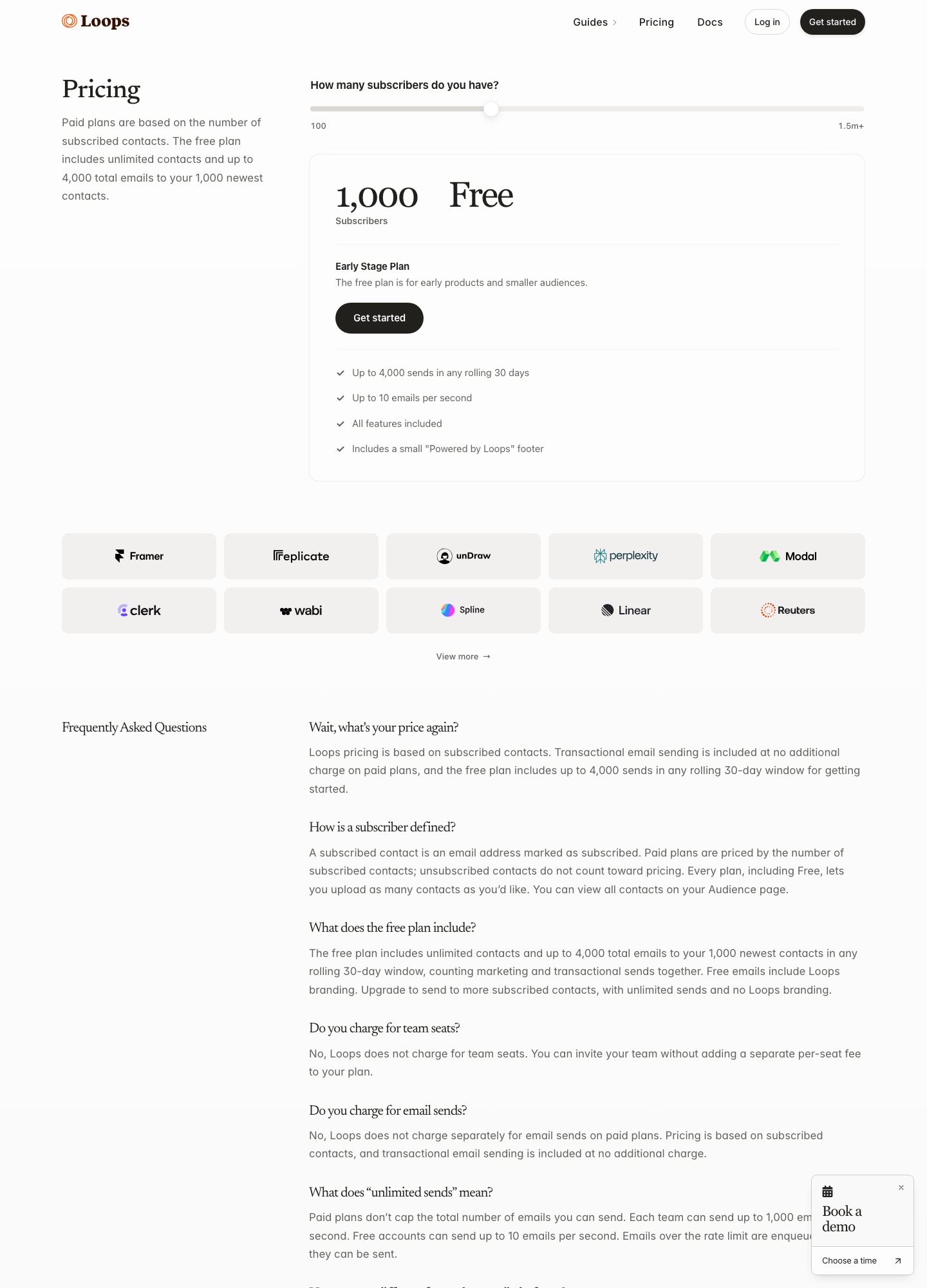
Loops counts subscribed contacts. Loops' pricing page lists two plans. The free Early Stage plan has unlimited contacts, but sends are limited to 4,000 in any rolling 30 days and only to the 1,000 newest contacts, with a small "Powered by Loops" footer and 10 emails per second. The paid Growing Audience plan has unlimited sends to subscribers and transactional sends to users outside your audience, and the price follows the slider: $48 at 4,788 subscribers, $99 at 9,998, $198 at 24,339 and $249 at 49,989. The page also says there is no charge for team seats.
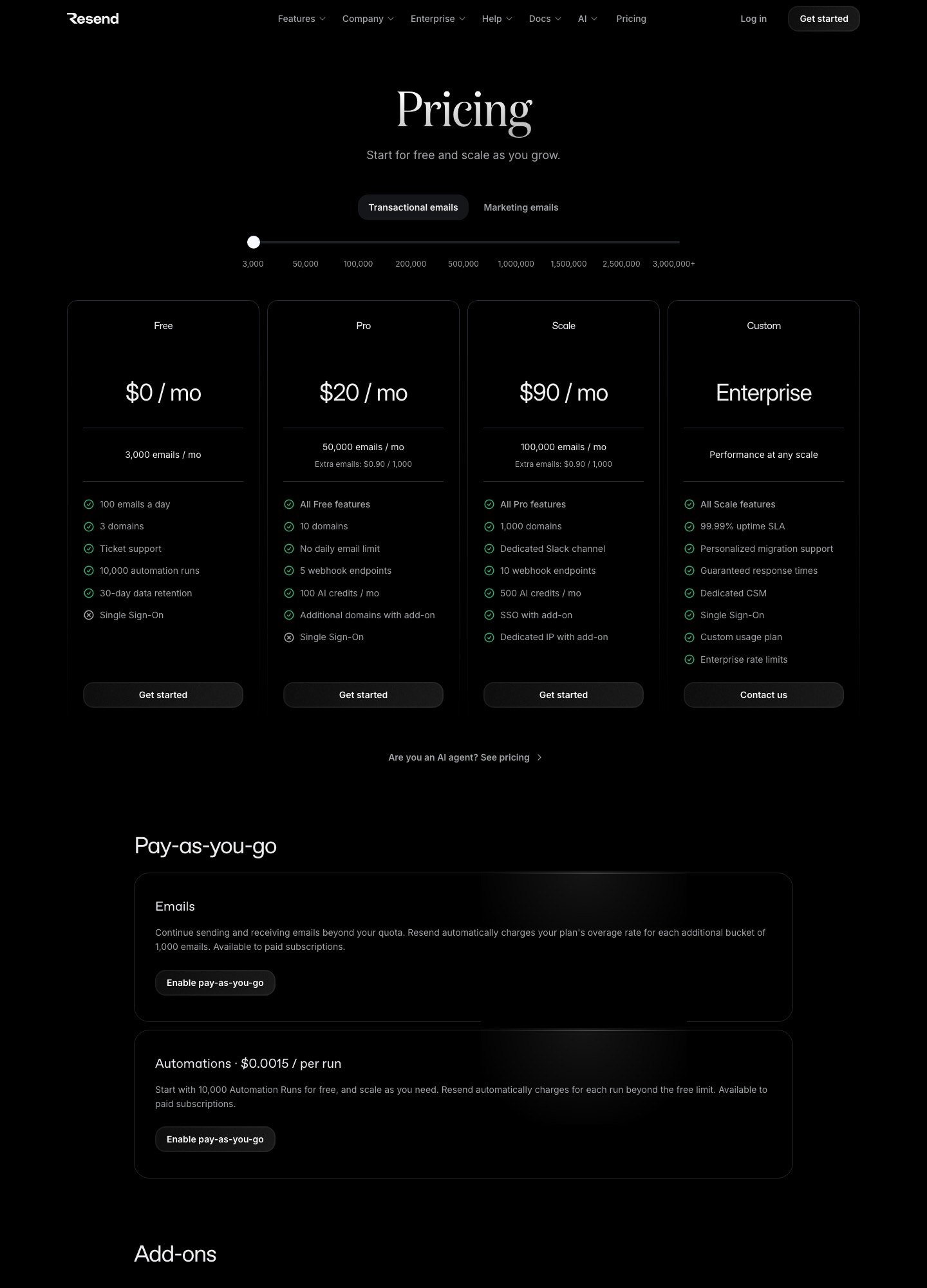
Resend counts three different things. Transactional email is metered by emails sent through its /emails API: Free is 3,000 a month with a 100-a-day cap, Pro is $20 for 50,000, Scale is $90 for 100,000, and extra emails cost $0.90 per 1,000 on both paid plans. Marketing is metered by contacts: $0 at 1,000, $40 at 5,000, $80 at 10,000, $180 at 25,000, $250 at 50,000 and $450 at 100,000, read off the Marketing tab on the same date. Automations are metered per run at $0.0015 beyond the 10,000 runs included. Resend's FAQ says broadcasts do not count against the transactional limits, and that marketing plans are limited only by the number of contacts.
That last rule matters for budgeting. With Resend you will have a transactional plan and a Marketing plan open at once, each with its own bill line. With Loops there is one number, and it moves only when your subscriber count does.
Cost with both transactional and lifecycle mail
The table assumes a product that sends transactional email to its users and also runs onboarding and newsletter mail to the same people, so the Resend column adds a Marketing plan to a transactional plan. Loops figures are the slider positions closest to each size; they are not exact matches for the contact counts shown.
| Contacts / transactional emails per month | Loops | Resend (Marketing + transactional) |
|---|---|---|
| 1,000 / 3,000 | $0 (free plan, but 4,000 sends in total) | $0 + $0 = $0 |
| 5,000 / 20,000 | $48 | $40 + $20 = $60 |
| 10,000 / 50,000 | $99 | $80 + $20 = $100 |
| 25,000 / 100,000 | $198 | $180 + $35 = $215 |
| 50,000 / 100,000 | $249 | $250 + $35 = $285 |
The $35 is the figure Resend's Pro slider shows at 100,000 emails; the Scale card quotes $90 for the same 100,000 but adds 1,000 domains and ten webhook endpoints. Automations are the part of the Resend bill the table leaves out. At 30,000 runs in a month the formula is (30,000 − 10,000) × $0.0015 = $30; Resend's page does not define a run, so confirm what counts as one before you build a long onboarding sequence on it.
The Loops free plan is the only one of these that cannot hold both kinds of mail for long: 4,000 sends cover transactional and lifecycle messages together, to the 1,000 newest contacts. Resend's two free plans are separate, so a small app can send 3,000 transactional emails and keep 1,000 marketing contacts at $0, although the transactional side stops at 100 emails a day.
If you only send transactional email
This is where Resend wins without argument. Its transactional meter does not care how many contacts you have: 3,000 emails is $0, 50,000 is $20, 60,000 is $20 + (10 × $0.90) = $29, 100,000 is $35 on the Pro slider, and 200,000 is $160 on Scale. Loops prices by subscribers, so a product with a large user base that emails them only for resets and receipts would be paying for contacts it does not market to. The way Loops' transactional guide describes it softens that: addresses that only receive transactional email are not added to your Audience and do not count toward billing, unless you set addToAudience in the request. Read your own subscriber count off the slider before you rule it out.
Transactional email in each product
Loops' transactional guide describes a template-first model. You compose the message in Loops' editor or upload MJML, add data variables such as a reset link, publish it, and your code posts the template's transactional ID with the recipient and the variable values. A draft can be edited while the published version keeps sending, and the guide says missing a required data variable, or sending without a published message or a verified domain, produces a 400-level error. Transactional messages carry no unsubscribe link, no open or click tracking, and reach unsubscribed contacts, which is why Loops tells you not to send marketing content through them. For testing, sends to addresses ending in @example.com or @test.com succeed without sending anything.
Resend's model is code-first. Its pricing page lists the REST API, SMTP relay, official SDKs, batch sending, scheduled sends and React Email on every plan, so the message can be built in your repository and rendered at send time. Its FAQ says a transactional email can go to any address, while broadcasts only reach existing contacts, and that a newsletter sent through the /emails API needs your own visible unsubscribe link plus the List-Unsubscribe headers. If your team keeps email copy in a repo and reviews it in pull requests, that favours Resend; if marketers edit the copy in a browser, the Loops editor is the safer fit.
Webhooks and events
The two differ more here than anywhere else, and it decides migrations. Loops allows one webhook endpoint per account, signs every request (headers Webhook-Signature, Webhook-Id and Webhook-Timestamp), caps delivery at 10 events a second, and retries up to eight times over about 28 hours; an endpoint that fails for five days is switched off. Its events cover contacts (created, unsubscribed, deleted, mailing-list changes) as well as email sends and outcomes: transactional.email.sent, email.delivered, email.softBounced, email.hardBounced, email.opened, email.clicked and email.spamReported, each with a sourceType of campaign, loop or transactional. The history on the Webhooks page is kept for 30 days.
Resend's webhooks are limited by plan to 1, 5 and 10 endpoints on Free, Pro and Scale, and its pricing page lists signed webhook endpoints. Its documented email events include sent, delivered, delayed, bounced, complained, opened, clicked, failed, scheduled, suppressed and received, and it also has domain events. Retries run on a schedule from immediately through 10-hour gaps, you can replay any failed or successful message from the dashboard, and a failing endpoint is disabled with an email to your team. A single Loops endpoint receiving contact events and email events together means one handler has to route both; Resend's several endpoints let you split them.
Which to choose
- Choose Loops if you are a small SaaS team and the same people need onboarding, product announcements and transactional mail, because one subscriber-based price covers all three, there are no seat fees, and marketers can edit sends without a deploy. On the readouts above, the difference against Resend with a Marketing plan is $12 a month at about 5,000 contacts, $1 at 10,000, $17 at about 25,000 and $36 at 50,000.
- Choose Resend if the volume is mostly transactional, the templates live in code, you want several webhook endpoints, or you want to keep the mail you send to customers separate from the mail you send to a list. It is the cheaper option whenever you do not need the Marketing plan at all, since the transactional meter ignores your contact count.
- Look further if you want a larger lifecycle platform than Loops, in which case read Customer.io against Loops, or if your volume is above a few hundred thousand emails a month and price is the main concern, where Resend against SendGrid and the Resend pricing guide are better starting points.
Moving between them
Loops to Resend
Export contacts and mailing lists before you cancel, and decide which of them are marketing contacts, since only those belong in Resend's Marketing contacts and only they will be billed there. Recreate each transactional template as code or a Resend template and keep the Loops transactional ID mapped to the new one in a single lookup, so the application changes in one place. Verify the sending domain in Resend and publish its SPF and DKIM records next to Loops' for a week. Rewrite the single Loops webhook consumer around Resend's separate events, and re-add the unsubscribe handling for any newsletter you now send through the API.
Resend to Loops
Import the Marketing contacts, not the whole transactional address history, because Loops bills subscribed contacts and sends to addresses outside the Audience at no cost. Rebuild each React Email template in the Loops editor or as uploaded MJML, define its data variables, publish it and swap the send call for a transactional ID. Resend's Free-plan 100-a-day cap disappears, but Loops' own free-plan ceiling is 4,000 sends in 30 days, so start the cutover only after choosing a paid plan.
FAQ
Does Resend have marketing features now?
Yes. Its pricing page has a Marketing tab with contacts, broadcasts, segments and automations, free at 1,000 contacts and $80 a month at 10,000. Broadcasts are metered separately from transactional email.
Is transactional email free on Loops?
The pricing page says transactional sending is included at no extra charge on paid plans. The free plan has a 4,000-send ceiling over any rolling 30 days that covers all sends.
Which has the better free plan?
For transactional mail alone, Resend: 3,000 emails a month against Loops' 4,000 sends, which are shared with lifecycle mail and limited to your 1,000 newest contacts. For a first product with a small list and both kinds of mail, the two are close, and Loops adds a footer on its free plan.
Can I use both?
Many teams do: Loops for lifecycle mail and Resend for transactional. You pay for both meters and keep two sets of DNS records and webhooks, so it makes sense only when the Resend transactional side is large.
Related pages
See Resend pricing, Resend alternatives, Customer.io vs Loops, Plunk vs Resend and the startup use-case page.