Customer.io vs Loops for SaaS email
Loops is the cheaper and simpler of the two at every list size both publish. Its free plan costs nothing while you stay inside 4,000 sends a month to your 1,000 newest contacts, and its paid slider reads $99 a month at 9,998 subscribers and $249 at 49,989. Customer.io's Essentials plan reads $145 at 10,000 profiles and $505 or more at 50,000. The gap buys you something on the Customer.io side: objects and relationships, 1 million emails a month, two workspaces and an AI agent, all on a plan billed monthly. Loops answers with a flat model in which every feature is on every plan and sends are not metered.
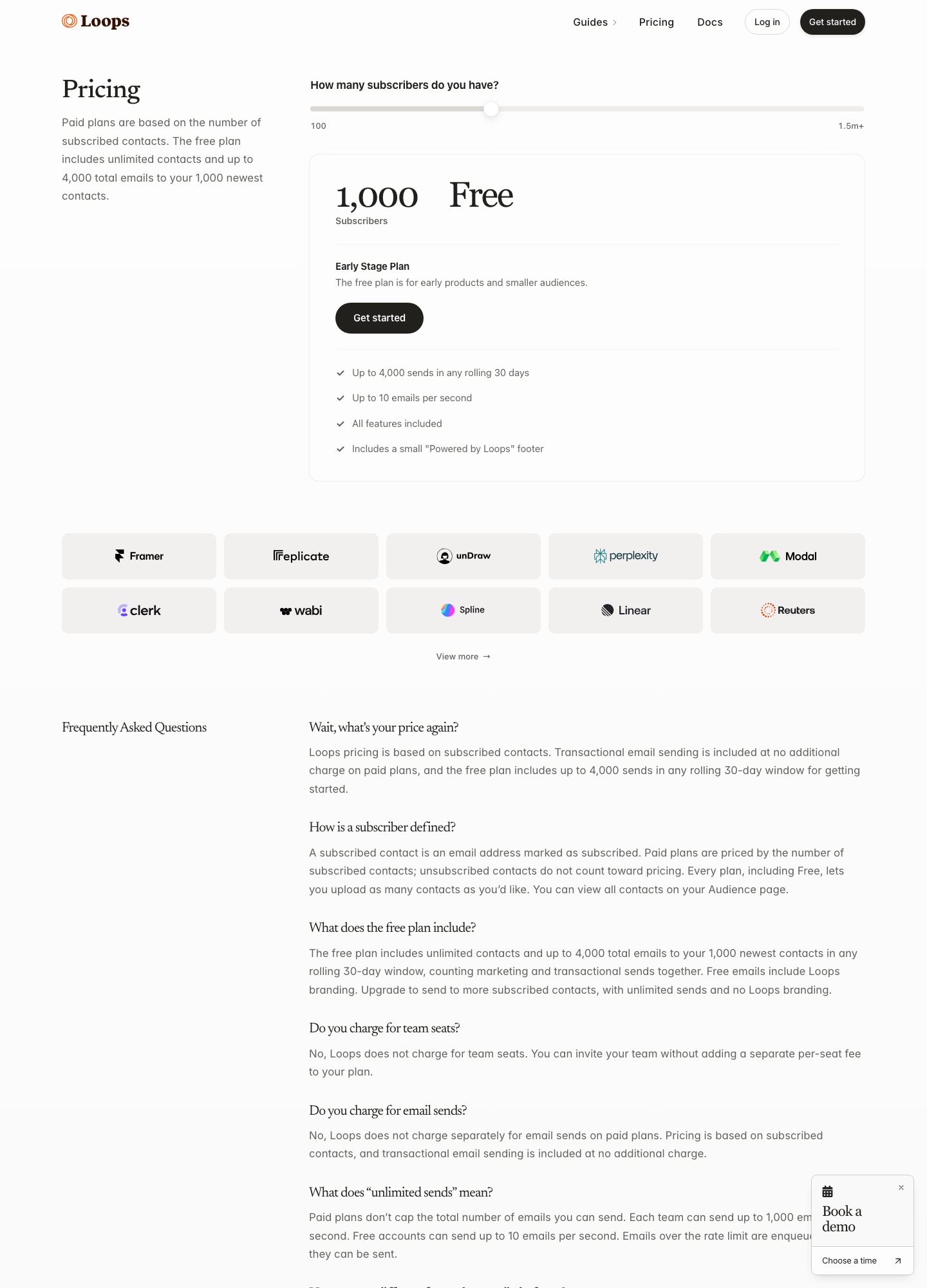
What you pay at each list size
Loops' pricing page computes its price in the browser from a subscribers slider, and the slider lands on odd numbers rather than round ones. Customer.io's pricing page offers round profile counts under Essentials. These are the nearest readouts from October 7, 2026.
| Size | Loops (subscribed contacts) | Customer.io Essentials (profiles) |
|---|---|---|
| 1,000 | Free | $100 (cheapest listed, at 5,000 profiles) |
| 4,788 / 5,000 | $48 | $100 |
| 9,998 / 10,000 | $99 | $145 |
| 24,339 / 25,000 | $198 | $280, derived |
| 49,989 / 50,000 | $249 | $505+ |
The 25,000 figure for Customer.io was not on a readout, so it is derived from the page's own rate of $0.009 for each additional profile: its $235 at 20,000 plus 5,000 × $0.009 = $45 gives $280, and working back from its $325 at 30,000 gives the same $280. At 10,000 contacts the monthly gap between Customer.io's $145 and Loops' $99 is $145 − $99 = $46, or $552 a year. At 50,000 the gap between Customer.io's $505 and Loops' $249 is at least $256 ($505 − $249), or $3,072 a year, which is the size at which the Customer.io page itself points to Premium for a similar price.
Check what each meter counts before trusting the table. Loops charges for subscribed contacts, and its FAQ says unsubscribed contacts do not count. Customer.io charges for profiles, which include people and objects, and its billing guide says test, dev and sandbox workspaces count toward the total. A product with 10,000 users in 2,000 customer accounts that models each account as an object would be near 12,000 Customer.io profiles, or $145 + 2,000 × $0.009 = $163 a month, before any other costs.
The free plan and the startup offer
Loops' free plan has unlimited contacts but sends at most 4,000 emails in any rolling 30 days, to your 1,000 newest contacts, counting marketing and transactional mail together. It carries a small Powered by Loops footer and is limited to 10 emails per second. Customer.io has no free plan. Instead, early-stage companies that have raised under $10M can get 12 months free through its Startup Program, subject to its eligibility check. Because the Loops cap counts every send, a product with 800 users that mails a weekly digest uses about 800 × 4 = 3,200 of its 4,000 sends, leaving 800 for welcome emails, resets and everything else.
Sending model and limits
Loops' paid plans do not meter sends. The pricing FAQ puts the ceiling at 1,000 emails per second per team, and emails above that rate wait in a queue. Customer.io Essentials includes 1 million emails a month and charges $0.12 for each additional 1,000, so a team of 10,000 profiles sending 120 emails each (1,200,000 in all) would pay 200 × $0.12 = $24 on top of its $145. Essentials also leaves out chat support, managed deliverability and custom role-based permissions; Premium starts at $1,000 a month billed yearly.
Data model and automation
Customer.io describes itself in its docs as revolving around people. You identify them, set attributes, send events, and optionally relate them to objects such as accounts or courses; Essentials allows 2 object types and Premium 10. Loops' API reference lists contacts, contact properties, mailing lists, events, event patterns, workflows and transactional emails, and no object or company resource, so account-level logic has to live in contact properties or in your own database. Events trigger Loops workflows through an Event received node; the events guide says sending an event for an unknown email creates the contact, and that platform events arrive from Stripe, Clerk and Supabase through incoming webhooks.
The send-event call from the Loops API reference:
curl --request POST \
  --url https://app.loops.so/api/v1/events/send \
  --header 'Authorization: Bearer <token>' \
  --header 'Content-Type: application/json' \
  --data '
{
  "email": "alex@company.com",
  "userId": "usr_7f8e9d0c1b2a",
  "eventName": "signup",
  "eventProperties": {
    "plan": "pro"
  },
  "mailingLists": {
    "clm2k8j4h6g0f8d6s4a2b0z8": true
  },
  "favoriteColor": "blue",
  "planName": "Pro"
}
'
Transactional email in each
Loops includes transactional sends on paid plans at no extra charge. Its transactional guide says those emails carry no unsubscribe link, do not track opens or clicks, and still reach contacts who have unsubscribed. Recipients do not need to be in your audience, and a transactional send to a new address does not add it to the audience or the bill unless you set addToAudience. The request from the API reference:
curl --request POST \
  --url https://app.loops.so/api/v1/transactional \
  --header 'Authorization: Bearer <token>' \
  --header 'Content-Type: application/json' \
  --data '
{
  "email": "alex@company.com",
  "transactionalId": "cll42l54f20i1la0lfooe3z12",
  "addToAudience": true,
  "dataVariables": {
    "name": "Alex",
    "passwordResetLink": "https://app.company.com/reset/abc123"
  }
}
'
Customer.io's transactional API is documented in its transactional guide. Messages use a transactional_message_id, links are tracked by default unless you switch on Protect sensitive data, sends can be scheduled up to 90 days ahead, and a separate transactional IP pool can be requested on a dedicated sending domain. Our transactional versus marketing guide explains why that split matters for deliverability.
Webhooks
Loops allows one webhook endpoint per account. Each request carries Webhook-Signature, Webhook-Id and Webhook-Timestamp headers, and the webhooks guide lists events such as email.delivered, email.hardBounced, email.spamReported and contact.unsubscribed, with 30 days of delivery history. Customer.io's reporting webhooks can be created and managed through its API, are signed with an HMAC-SHA256 X-CIO-Signature, and allow your endpoint 4 seconds to return 2xx before retrying over seven days.
Which to choose
Choose Loops if you are a small SaaS team that wants to launch onboarding, product updates and system emails in an afternoon, you have fewer than a few thousand contacts, and you would rather not think about meters. Choose Customer.io if your product has accounts, teams or other objects that messages must follow, if you need several workspaces, or if you need a vendor with Premium and Enterprise tiers waiting above you. For a developer-only sender, a transactional specialist such as Resend is cheaper than either; see Loops vs Resend.
Moving between them
From Customer.io to Loops, export people with their attributes and map each attribute to a Loops contact property before importing. Flatten objects into properties such as plan name and account role, because Loops has no object type. Re-send your key events with eventName so workflows have a trigger, recreate each campaign in a Loops workflow, and verify your sending domain first, since the API rejects sends without one. From Loops to Customer.io, decide up front which entities become objects, mind the two-object-type limit on Essentials, and expect the profile count to include them. Publish new DKIM and SPF records, carry over your unsubscribed list and keep transactional templates identical until you cut over.
Related pages: Customer.io vs Drip, Userlist vs Customer.io and email tools for startups.
FAQ
Is Loops really free?
The free plan is real but limited: up to 4,000 sends in any rolling 30 days to your 1,000 newest contacts, with a Loops footer. Paid plans start from the subscribers slider, which read $48 at 4,788.
Why does Customer.io cost more for a similar list?
Customer.io meters profiles, including objects, and bills emails above 1 million at $0.12 per 1,000, while Loops meters only subscribed contacts. Customer.io also offers more workspaces, objects and enterprise tiers.
Can I send password resets from Loops?
Yes, on paid plans at no extra charge, and on the free plan within the 4,000 monthly send limit. You publish a template, then call the transactional endpoint with its ID and your data variables.
Does Customer.io have a free plan?
No. Its pricing page starts at $100 a month for 5,000 profiles, and offers 12 months free to early-stage companies that have raised under $10M.