Customer.io vs Drip: event-driven SaaS or store-driven lifecycle email
Customer.io is cheaper than Drip from about 10,000 people upward. On October 7, 2026 the Customer.io Essentials plan read $145 a month at 10,000 profiles against Drip's $154, and the gap widens to $124 at 30,000 and at least $194 at 50,000. Below that, Drip wins: at 5,000 people it asks $89 where the Customer.io entry price is $100. The money is the smaller part of the decision, though. Customer.io is built around people, events and objects that your product sends it, and it includes transactional email. Drip is built around store and shopper activity, and its API has no one-off send endpoint.
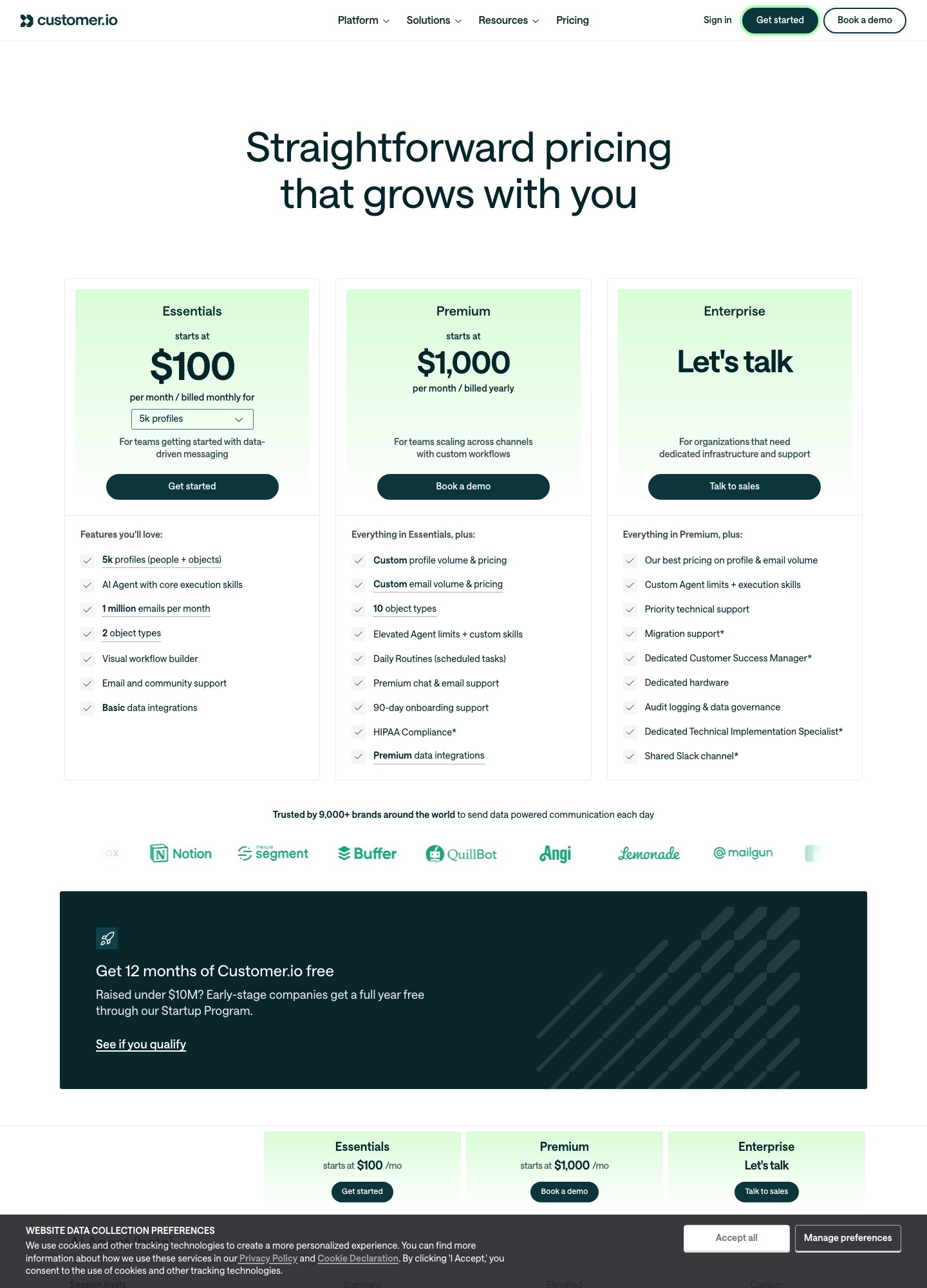
Prices at the same list size
Customer.io's pricing page has a profile selector under Essentials, billed monthly. Drip's pricing page has a people slider. These are the readouts at positions both pages offer.
| List size | Customer.io Essentials | Drip | Cheaper | Difference per month |
|---|---|---|---|---|
| 5,000 | $100 | $89 | Drip | $11 |
| 10,000 | $145 | $154 | Customer.io | $9 |
| 20,000 | $235 | $289 | Customer.io | $54 |
| 30,000 | $325 | $449 | Customer.io | $124 |
| 40,000 | $415 | $609 | Customer.io | $194 |
| 50,000 | $505+ | $699 | Customer.io | $194 or more |
At 30,000 the difference between Drip's $449 and Customer.io's $325 is $449 − $325 = $124 a month, which is $1,488 over a year. The "$505+" at 50,000 means the page shows a floor and suggests Premium for a similar price, so the true gap is at least $699 − $505 = $194. Customer.io's page also lists $0.009 for each extra profile, which is how its steps work: its $145 at 10,000 and $235 at 20,000 differ by $90, or 10,000 × $0.009.
What the two meters count
Customer.io counts profiles, and a profile can be a person or an object such as an account or a course; Essentials includes 2 object types. Its billing documentation says a profile that exists at any point in the billing period counts toward that month's bill even if you delete it, and that deleting a profile and adding it back in the same period counts it twice. Clearing out stale users therefore only pays off next month.
Drip states that cost follows the number of active people and the volume of email sent in the month. Its readouts at 40,000 and 50,000 people list 480,000 and 600,000 email sends, which is 12 sends per person on both (480,000 ÷ 40,000 and 600,000 ÷ 50,000). Customer.io Essentials lists 1 million emails a month, or 20 per profile at 50,000 profiles, and charges $0.12 for each additional 1,000. A store that mails its whole list a few times a week should check Drip's send count at its list size before trusting the table above.
What the cheaper plan leaves out
On Customer.io, Essentials excludes chat support, managed deliverability and custom role-based permissions; those arrive with Premium, which starts at $1,000 a month billed yearly. Essentials still lists the visual workflow builder, two workspaces, unlimited user seats and unlimited webhooks in and out. Companies that have raised less than ten million dollars can get 12 months free through its Startup Program, which Drip has no match for: Drip offers a 14-day trial with no card.
Drip's entry tier lists up to 50 workflows, dynamic segments, onsite campaigns, open API access, free migration and personalized onboarding. If your lifecycle has more than 50 separate automations, ask whether that limit still applies at your list size before committing.
Events, transactional email and webhooks
Customer.io's track API now sits beside a newer Pipelines API. Its Track API reference says the Pipelines API is the one to use when you integrate directly, because it supports objects and batching. Events carry a name of up to 100 bytes and data of up to 100,000 bytes, and the track limit is 1,000 requests per second. Transactional messages go through a separate App API call, per the transactional API guide:
message='
{
  "to": "sarah@example.io",
  "transactional_message_id": 3,
  "message_data": {
    "first_name": "Sarah",
    "passwordResetURL": "https://www.example.io/password?token=12345"
  },
  "identifiers": {
    "id":"1234"
  }
}
'

echo $message | curl -v https://api.customer.io/v1/send/email \
-H 'Content-Type: application/json' \
-H 'Authorization: Bearer APP-API-TOKEN' \
-d @-
The guide recommends a template with a transactional_message_id so that metrics group by message, and says you can schedule a send up to 90 days ahead with send_at. It also describes a separate transactional IP pool, available on request once you set up a dedicated sending domain. Customer.io's reporting webhooks are signed with an X-CIO-Signature header, an HMAC-SHA256 over v0:<timestamp>:<body>, and the endpoint has 4 seconds to answer 2xx before retries run for seven days with exponential backoff.
Drip's REST API is built on subscribers, events and workflows. A workflow can be started through its own endpoint, and the docs note that an inactive workflow will not add the subscriber:
curl -X POST "https://api.getdrip.com/v2/YOUR_ACCOUNT_ID/workflows/WORKFLOW_ID/subscribers" \
  -H "Content-Type: application/json" \
  -H 'User-Agent: Your App Name (www.yourapp.com)' \
  -u YOUR_API_KEY: \
  -d @- << EOF
  {
    "subscribers": [{
      "email": "john@acme.com",
      "time_zone": "America/Los_Angeles",
      "custom_fields": {
        "shirt_size": "Medium"
      }
    }]
  }
EOF
The API reference covers up to 3,600 single requests and 50 batch requests an hour, with up to 1,000 records per batch. Its webhook events include subscriber.performed_custom_event. The reference lists no transactional send endpoint, so receipts and password resets need a different service alongside Drip.
When each one wins
Customer.io fits a SaaS product that already emits events such as sign-ups, plan changes and feature use, and that wants one tool for those lifecycle flows and for system emails sent through an API. It also wins on cost once the list passes 10,000. Drip fits a store on Shopify, WooCommerce or BigCommerce, where its integrations feed cart and order data directly and the pricing page promises revenue traced to the email that earned it. At 5,000 people Drip is the lower bill, so a small store has no price reason to move. If you want a transactional API only, neither is the specialist: compare Resend, Postmark and Amazon SES.
Switching between them
Going from Drip to Customer.io, export subscribers with custom fields and tags and import them as people, then replay recent behaviour through the track API so segments are not empty on day one. Going the other way, Drip's batch endpoint takes 1,000 records a call and 50 calls an hour, so a 200,000-event backfill needs about four hours at that ceiling (200,000 ÷ 50,000 an hour). In both directions, rebuild each automation by hand, move your sending domain's DKIM and SPF records last, export unsubscribes and bounces first, and decide where transactional mail goes: Customer.io can keep sending it, Drip cannot.
For related pairings see ActiveCampaign vs Drip, Customer.io vs Loops and the guide to choosing an email tool.
FAQ
At what list size does Customer.io become cheaper than Drip?
The readouts cross between 5,000 and 10,000. Drip is $100 − $89 = $11 cheaper at 5,000 than Customer.io, which is $154 − $145 = $9 cheaper at 10,000 and cheaper at every larger size listed.
Does Customer.io charge for unsubscribed or deleted people?
It bills profiles, not subscriptions, and its billing guide says a deleted profile still counts for the month it existed in. Drip's page says its price follows active people and monthly email volume.
Can Drip send password reset emails?
Drip's API reference has no transactional send endpoint, so use a separate service for those. Customer.io lists transactional emails as included on every plan.
Is there a free plan on either?
Neither lists one. Drip has a 14-day trial with no credit card, and Customer.io gives eligible companies that raised under $10M a year free through its Startup Program.