Userlist vs Customer.io for B2B SaaS
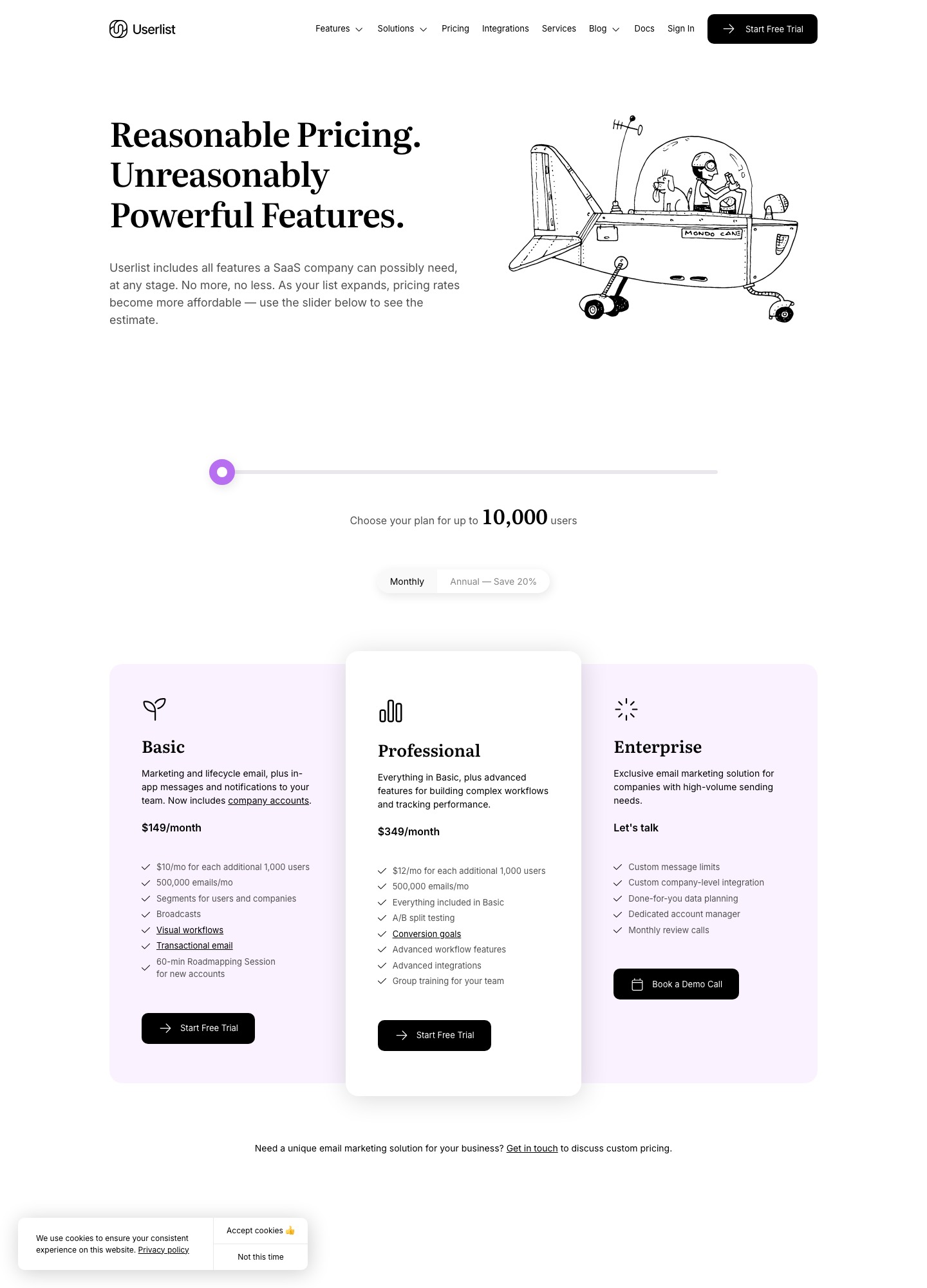
Userlist and Customer.io cost almost the same, so the choice is about how your data is shaped. On October 7, 2026 Userlist Basic read $149 a month for up to 10,000 users and Customer.io Essentials read $145 for 10,000 profiles. The difference runs from $149 − $145 = $4 at 10,000 to $369 − $343 = $26 at 32,000, because Userlist adds $10 for each extra 1,000 users and Customer.io adds $9 (its $0.009 per profile). What separates them is that Userlist treats a company as a first-class record that can have its own events and segments, while Customer.io is built around people and lets you hang objects off them.
Cost at five sizes
Userlist's pricing page has a slider with a Monthly and an Annual toggle that saves 20%; the figures here use monthly billing. Customer.io's pricing page reads $145 at 10,000 profiles, $235 at 20,000 and $325 at 30,000 for Essentials, billed monthly. Rows marked (d) are derived from each vendor's per-unit rate, with the arithmetic below.
| Size | Userlist Basic | Userlist Professional | Customer.io Essentials |
|---|---|---|---|
| 10,000 | $149 | $349 | $145 |
| 18,000 | $229 | $445 | $217 (d) |
| 20,000 | $249 (d) | $469 (d) | $235 |
| 30,000 | $349 (d) | $589 (d) | $325 |
| 32,000 | $369 | $613 | $343 (d) |
Userlist's 20,000 Basic figure is $149 plus 10 extra thousands at $10 = $249, and its Professional figure is $349 plus 10 × $12 = $469; the same formula reproduces the Userlist page's own $229 at 18,000 and $369 at 32,000. Customer.io's $217 is $145 plus 8,000 × $0.009 = $72, and its $343 is $325 plus 2,000 × $0.009 = $18. At 30,000 users Userlist Basic costs $349 − $325 = $24 more a month than Customer.io Essentials, $288 a year. Userlist Professional costs $349 against Customer.io's $145 at 10,000 users, which pays for A/B split testing, conversion goals, advanced workflow features and group training for your team.
What is counted and what is included
Userlist counts every user in the account, active or not, and sets your price from the high-water mark over the previous 30 days; its FAQ says you can remove users through the API to cut cost. Customer.io counts people and objects together as profiles, and its billing guide adds that profiles deleted during the month still count for it. A B2B product with 10,000 users in 2,000 accounts is therefore near 12,000 Customer.io profiles if each account is an object ($145 + 2,000 × $0.009 = $163), but still 10,000 on the Userlist user meter.
Message allowances differ more than the headline price. Userlist's billing docs give every plan 5 times the tracked user count in messages a month, with a floor of 500,000, and charge $1 for each additional 1,000. Customer.io Essentials includes 1 million emails and charges $0.12 per additional 1,000. A 10,000-user product that sends 600,000 messages in a month pays 100 × $1 = $100 extra on Userlist and nothing extra on Customer.io.
Some limits sit in the plan table. Userlist Basic caps custom properties at 20 and custom events at 20, with 5 team seats; Professional allows 50 properties, unlimited events and 10 seats. Customer.io Essentials lists unlimited user seats, 2 object types (Premium has 10) and 2 workspaces, and its Track API accepts up to 300 unique attributes per person. Userlist includes a 60-minute roadmapping session for new accounts, and its Basic plan lists transactional email, in-app messages and internal notifications to your own team. Customer.io Essentials lists unlimited push and in-app messages and WhatsApp, with SMS volume set by quote.
How each one models a company
Userlist's company accounts guide says you can send data on three levels: the company (plan, billing status, feature usage), the relationship between a user and a company (such as an account role), and the user. Its pricing table lists company profiles, company segments, many-to-many relationships and company-triggered campaigns. In the Push API, an event needs a user or a company, or both:
POST /events HTTP/1.1
Host: push.userlist.com
Authorization: Push your-push-key-here
Accept: application/json
Content-Type: application/json; charset=utf-8

{
  "name": "project_created",
  "user": "user-123",
  "company": "company-567",
  "properties": { "project_name": "New Project" }
}
Customer.io's objects documentation says objects can hold attributes and trigger messages when they change, but cannot receive messages or perform events themselves; you message the people related to an object. Through the Pipelines API a group call carries a groupId, a userId, traits.objectTypeId and optional relationshipAttributes, as the group spec shows. For "email every owner of an account whose card failed", Userlist reads the company's billing status directly. In Customer.io you set the same attribute on the object and target the related people.
Webhooks and transactional mail
Userlist's Push API includes a messages endpoint for transactional mail: you send a template identifier and a user, or supply a subject and body, and pick the email or web channel. Its workflow webhook node calls your endpoint with GET, POST, PUT, PATCH or DELETE when a user reaches that step, and reserves an X-Userlist-Signature header. The pages we read describe no delivery-reporting webhook for bounces and complaints, so confirm that before building on it.
Customer.io includes transactional email on every plan and sends it through a separate API, described in its transactional guide. Its reporting webhooks are signed with an HMAC-SHA256 X-CIO-Signature header and retried for seven days. For a pure transactional stream, compare Postmark and Resend against either.
Which one to choose
Choose Userlist if your product sells to teams, plan and billing state belong to the account, and you want campaigns triggered by company events with no object modelling. Choose Customer.io if you need push, in-app and WhatsApp, more than 20 custom events, unlimited seats, or an enterprise path above Essentials. Early-stage teams should compare offers: Userlist gives 50% off for the first 12 months to new SaaS accounts that have raised less than half a million dollars in total, which makes Userlist Basic at 10,000 users about $149 × 50% × 12 = $894 for the year, while Customer.io offers 12 months free to companies that have raised less than ten million. Userlist's trial lasts 14 days and asks for a card up front.
Moving between them
From Customer.io to Userlist, map each object type to a company, each relationship to a user-to-company relationship with its role property, and re-attribute any event that was recorded against a person but really belongs to the account. Userlist's quick start puts a data tracking plan first, so export your Customer.io attributes before the roadmapping call. From Userlist to Customer.io, export users, companies and events yourself, because the billing docs warn that cancelling deletes the account and its data permanently. Recreate company data as objects, keep within two object types on Essentials, and expect those objects to raise the profile count. In both cases move DKIM and SPF last, carry over unsubscribes, and rebuild workflows by hand.
See also Customer.io vs Loops, Customer.io vs Drip and email tools for B2B SaaS.
FAQ
Is Userlist more expensive than Customer.io?
Slightly. Basic was $149 against $145 at 10,000, and by 30,000 the derived gap is $24 a month. Professional costs more than double Essentials at 10,000 users.
Does Customer.io support company-level data?
Yes, through objects and relationships, with 2 object types on Essentials. Objects hold attributes but cannot receive messages or perform events, so campaigns target the people related to them.
What happens if I send more messages than my plan allows?
On Userlist, the overage is $1 per 1,000 messages above 5 times your tracked users, with a 500,000 floor. On Customer.io Essentials, emails past 1 million cost $0.12 per 1,000.
Can I try Userlist without paying?
It offers a 14-day free trial on all plans, with card details taken up front. Customer.io has no free plan, only the Startup Program for eligible early-stage companies.