Amazon SES alternatives for teams that want less to run
Amazon SES is the cheapest way to send transactional email, and almost nobody leaves it over the per-email price. They leave because the price buys infrastructure, not a product: you build the event pipeline, the dashboards, the alerting and the suppression handling yourself. If that work now costs more engineer time than the savings are worth, the realistic replacements are Postmark, Resend, Mailgun, SMTP2GO and MailerSend, and the rest of this page sorts them by what you are escaping. Prices were checked on October 7, 2026 against each vendor's own pricing page.
Why teams leave Amazon SES
The sandbox is per region and slow to clear
AWS's own production-access guide says every new account starts in a sandbox that is unique to each AWS Region. In it you can only send to verified addresses, at most 200 messages per 24 hours and 1 message per second, and AWS Support gives its first answer to an access request within 24 hours. A team that spreads across eu-west-1 and us-east-1 repeats that process per region. Plan the first send of any new region around that review, not after it.
The suppression list covers less than people assume
SES's account-level suppression list only receives hard bounces and, if you enable it for complaints, complaints. The same documentation notes that Gmail does not pass complaint data to SES, so a recipient who hits Spam in Gmail never lands on the list, and that entries are case-sensitive. Teams that discover this after a reputation scare tend to want a provider that owns more of the bounce and complaint workflow.
Visibility is something you assemble
SES reports through Amazon SNS and Amazon CloudWatch. That is flexible, and it is also a project: a topic, a subscriber, a store for message history and a search screen for support staff. Postmark, Mailgun and MailerSend ship an activity log; with SES that log is your build.
The advanced plans carry fixed fees
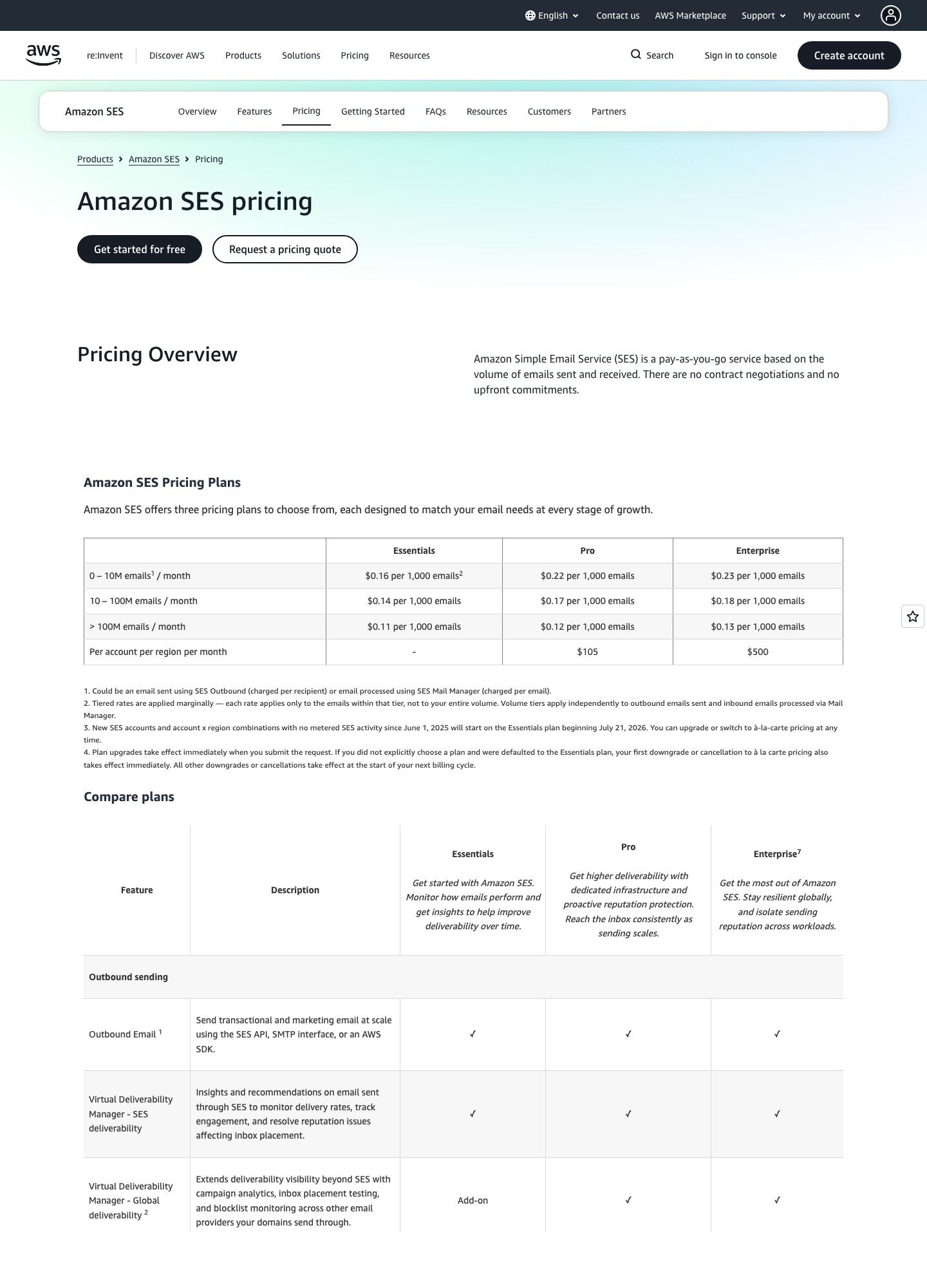
The SES pricing page now lists three plans. Essentials is $0.16 per 1,000 emails. Pro, which AWS describes as adding dedicated infrastructure and proactive reputation protection, is $0.22 per 1,000 plus $105 per account per region per month. Enterprise is $0.23 per 1,000 plus $500. The page also says new accounts start on Essentials from July 21, 2026. At 100,000 emails, Pro works out to $105 + (100 × $0.22) = $127, which is more than Mailgun's Scale plan at $90.
Five alternatives, and what each one takes off your plate
| Alternative | What you stop doing | What you give up |
|---|---|---|
| Postmark | Building a message-history search for support | Per-email cost: roughly ten times SES at 50,000 |
| Resend | Wiring IAM, regions and SNS just to send one message | Free tier is capped at 100 emails a day |
| Mailgun | Running your own logs, plus inbound routing if you receive mail | Log retention is 1 day on Basic |
| SMTP2GO | Hand-rolled SMTP credential management | An API-first event model |
| MailerSend | Building your own delivery dashboard | A published price at 10,000 or 100,000 |
What it costs at 10,000, 50,000 and 100,000 emails a month
SES Essentials is arithmetic: 10 × $0.16 = $1.60, 50 × $0.16 = $8, 100 × $0.16 = $16, and a million emails is 1,000 × $0.16 = $160. Postmark Basic is priced from a slider on its pricing page, with stops at 10,000, 50,000, 125,000 and 300,000 emails; on October 7, 2026 it read $15, $55 and $115 for the first three. 100,000 is not a stop, so I give no figure for it instead of computing one from the $1.80 overage rate. Resend's pricing lists Pro at $20 for 50,000 and Scale at $90 for 100,000. Mailgun lists $15, $35 and $90 for 10,000, 50,000 and 100,000. SMTP2GO's Starter is $15 for 10,000 and $1.20 per extra thousand, which gives $63 at 50,000; at 100,000 the Professional plan is $75 on SMTP2GO's pricing page, cheaper than Starter plus overage ($123). MailerSend publishes $31.50 for 50,000 emails and no figure at the other two sizes.
| Provider | 10,000 | 50,000 | 100,000 |
|---|---|---|---|
| Amazon SES Essentials | $1.60 | $8 | $16 |
| Postmark Basic | $15 | $55 | Not a slider stop ($115 at 125,000) |
| Resend | $20 (Pro; Free stops at 3,000) | $20 | $90 |
| Mailgun | $15 | $35 | $90 |
| SMTP2GO (Starter, then Professional at 100,000) | $15 | $63 | $75 |
| MailerSend | Not published | $31.50 | Not published |
The gap is real. SES at 100,000 emails is $16 (100 × $0.16), and SES at 125,000 emails is $20 (125 × $0.16). Against that, SMTP2GO Professional is $75 at 100,000, and Postmark's nearest slider stop, 125,000, reads $115 on Basic. Whether that is a good trade depends on how many hours a month your team spends on SES plumbing, so count those hours before you decide.
Which one to pick if you are leaving SES
Postmark is the answer when support staff need to look up "did this password reset go out" without asking an engineer. On its slider Basic is the cheapest of its Basic, Pro and Platform plans at every stop ($55, $60.50 and $66 at 50,000), so move up only for what the dearer plans add, such as retention beyond 45 days. Resend suits a small team that wants an API and nothing else; its 100-a-day free cap is the main thing to plan around. Mailgun is the one to take when you also receive email, because inbound routes come with the account. SMTP2GO is the lowest-effort move when your applications already speak SMTP and you mainly want a relay with a log. MailerSend fits a smaller team that wants an API, an SMTP relay and a hosted activity view in one account; its Free plan is 500 emails a month and the paid ladder jumps from 5,000 (Hobby, $6.30) to 50,000 (Starter, $31.50), so check that the gap matches your real volume.
When to stay on SES
Stay if your platform team already runs SNS, CloudWatch and IAM, you send millions a month, and a $160-per-million line is the point of the exercise. In that case the fix for your current pain is usually to wire up the configuration set and event destination properly rather than to switch vendors.
Moving off SES without losing suppression data
Export the list first
AWS documents ListSuppressedDestinations in the SES API v2 for reading your account-level list, and it pages with a NextToken. Pull every page before you touch anything, store it, and load it into the new provider's suppression import. If you skip this, the new provider's first complaint-heavy send goes to addresses SES had already refused.
Authenticate on a subdomain
SES's Easy DKIM signs with a 2048-bit key by default through DNS records you added. Leave those records in place. Add the new provider's SPF and DKIM on a new sending subdomain, send a low-stakes stream first, and retire the SES records only after a full billing cycle with no rollback.
Replace the SNS subscriber
Whatever consumed your SNS topic now needs to read the new provider's webhook payload. Keep your internal message ID in the request metadata so the old and new event shapes can both be mapped to one record.
Related pages on this site
Compare the two incumbents head to head in Amazon SES vs SendGrid, read the full Amazon SES pricing breakdown, and see why SMTP and API sending behave differently in API vs SMTP.
FAQ
Is Amazon SES really that much cheaper than Postmark?
On sending fees alone, yes. SES at 125,000 emails is $20 (125 × $0.16). Postmark Basic's slider reads $115 at the same volume, and its price includes message history and a managed bounce workflow, which SES leaves to you.
Can I leave SES gradually?
Yes. Keep the SES credentials active, route one message class to the new provider through a subdomain, and move the others after bounce and complaint handling look right.
Do I need to stay on SES for the AWS credits?
New AWS customers can receive up to $200 in credits and a free plan for six months, according to the SES pricing page. That favors starting on SES, not staying once the credits run out.